

How do fuel customers order from a branded app?
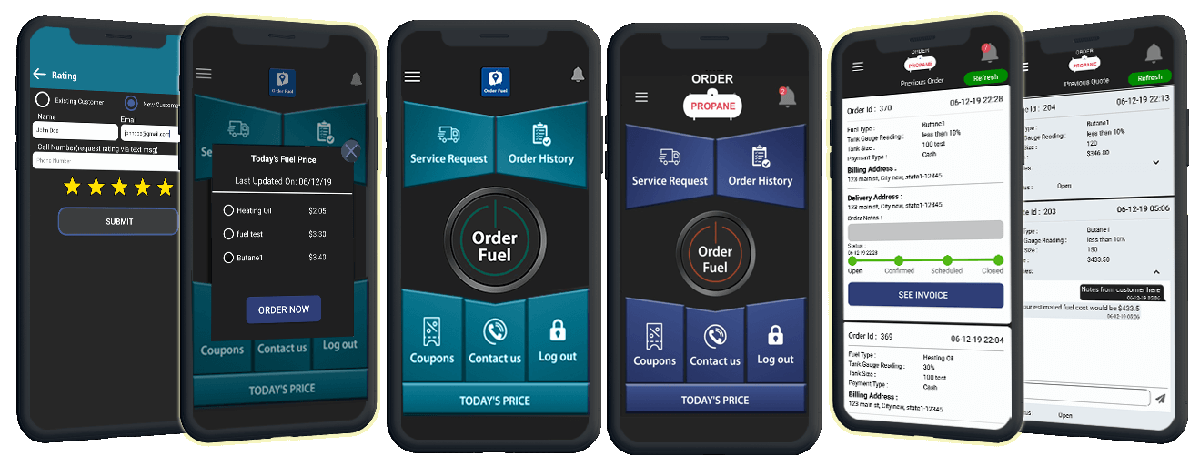
Fuel customers order from a branded app by opening the fuel company's own phone app, placing an order, choosing how to pay, and watching status in that same app. They can message the office there too. The order lands on the company's web portal, not on a sticky note. Custom Fuel App builds that branded app for US fuel delivery companies.
How do customers place a fuel order in the app?
They open the company's branded app, pick how they want to order, confirm, and send it. They do not have to call the office to start the ticket. On Custom Fuel App, the office can turn order types on or off so the customer only sees what that book uses: fill up, a set number of gallons, a tank reading, or a dollar amount.
The customer taps one of those, confirms, and the order goes to the desk. The app carries the fuel company's name and logo. The customer sees the same company they already buy from. That is the point of a branded app rather than a generic portal. For what white-label means, read what a white-label fuel ordering app is.
This is a second door, not a locked one. Customers who want to call can still call. The written order is for the people who would rather tap than wait on hold.
Example: A customer orders at 9pm; the order is waiting in the morning queue, no voicemail to retype.
What could fewer orders to retype mean for your office? Use the dealer ROI calculator to estimate your own numbers. The model is an estimate, not measured savings.
How do customers pay for a fuel order?
They pick a payment method in the app when they place the order. Credit card is one option on Custom Fuel App. The office can turn other payment types on or off, so the phone path can match how that company already takes money. The app does not force one path on every book.
Some books want card on the phone. Some books still take other methods the company already uses. The office can also choose to show fuel prices in the app, or to show an offer instead. That is a setting, not a rule. This page does not list those figures.
Can customers message the office from the app?
Yes. Instant messaging is built in. The customer can write the office in the app instead of leaving a voicemail. The office answers from the web portal. The thread stays with the order, so the next person on the desk can see what was already said. That is a written note, not a lunch-hour pad.
Messaging does not replace the phone line. Some customers will always call. That is fine. The win is the notes that no longer sit on a pad next to the lunch box.
How do customers see order status?
They open the app and look at the order. Custom Fuel App shows a track-order screen on the customer phone. The office can push a status update from the web portal in a couple of clicks. The customer does not need to call and ask where the truck is. The note is a written record they can check again later.
Push notices can also tell the customer that something changed. Those notices go out from the office dashboard to the phone they already have. The notice still comes from the fuel company, not from a generic brand.
Does sending an app order or seeing its status confirm a delivery date?
No. Submitting an order is a request for your office to manage. Sending it or seeing an order status does not by itself confirm a delivery date. Your office confirms the delivery with the customer. Customers can also order in a browser without downloading an app; the request still needs office confirmation.
See how browser ordering works and why a request needs office confirmation for the same qualification on website orders.
In your Custom Fuel App demo, ask to follow one anonymized request from a browser or the app to the office dashboard. Have staff demonstrate reviewing and accepting the request, then confirming the delivery with the customer. Check what the customer sees before and after office confirmation; a sent request alone does not mean a truck is booked.
What does the office see when an order comes in?
Every order lands on the office web portal. Staff can manage incoming orders, filter them, message the customer, update status, and pull reports. Daily, weekly, monthly, and yearly views are on that same screen. Status updates are two clicks from there. This is the desk side of the product, not a pretty customer screen with no back office.
The customer app is what they tap. The portal is what the desk uses. Orders that live on the portal can be assigned and closed. Orders that live only on a voicemail get lost on the first cold morning. The portal does not drive the truck. It keeps the ticket where the next person can find it.
Can the office send coupons and push notices?
Yes. The office can create coupons in the portal with templates and send push notices from the same dashboard. Notices can go to one customer or to many. Use them for an order update, an offer, or a simple reminder. Do not treat a push as a substitute for a delivery you still have to make.
The home page also notes that the office can send special messages to selected customers or to all customers. That is the same channel: your notice, on their phone, under your name.
Can customers order from a browser instead of the app?
Yes. Customers who do not want to install an app can order from a web ordering page on the company's site. See the web ordering portal. The mobile app and the web path are the same idea: the order is yours, in your brand, in a record you can work. Some customers will use both.
Some will only use the browser. The office still sees the ticket on the portal. If a customer prefers the store apps, Custom Fuel App is listed on the App Store and on Google Play under the company's brand once it is live. The office does not need in-house developers to keep that listing running.
What fuels can customers order this way?
Custom Fuel App is built for US fuel delivery companies. That includes propane, heating oil, diesel, and compressed gas. The buyer is the fuel company. The person who taps the app is the customer who takes the delivery. This page is fuel-neutral on purpose. Do not treat a propane-only walkthrough as the whole product.
Many companies run more than one fuel. The site has separate pages for propane ordering, diesel and heating oil ordering, and compressed gas ordering because the customer screens can match the fuel. The office still gets orders on the same kind of dashboard.
If your book is mixed, say so on the demo. Ask to see the fuels you actually deliver. Do not let a demo stay on one fuel if your trucks carry two.
To see the product itself, start on the Custom Fuel App home page or request a demo. Call 610-228-0887.