

What is a white-label fuel ordering app?
A white-label fuel ordering app is a phone app that carries your company's name, logo, and colors. Your customers use it to order fuel, pay, and see order status. They do not order from a generic portal with another brand on the screen. Custom Fuel App builds that app for fuel delivery companies.
What does white-label mean for a fuel company?
White-label means the app looks like yours, not ours. Your name is on the home screen. Your logo is on the order screen. Your phone number is still the number they call if they want a person.
That matters because your customer already knows you. They heat with you. They run equipment on your diesel. When they open an app to order, they should see the same company they already trust. If they see a generic name, they may think they left your company.
Custom Fuel App is built that way on purpose. The product pages say it plainly: your logo, your name, your app. Custom Fuel App builds it and hosts it. You do not need your own developers to put an app in the App Store or on Google Play.
The buyer is the fuel delivery company. The person who taps the app is your customer. Keep those two jobs straight when you shop. You are not buying a consumer fuel app for yourself. You are buying a branded tool your customers will use.
How do customers order fuel in a branded app?
They open your app, place an order, pick a payment method, and get status updates in the app. They do not have to call the office to start an order.
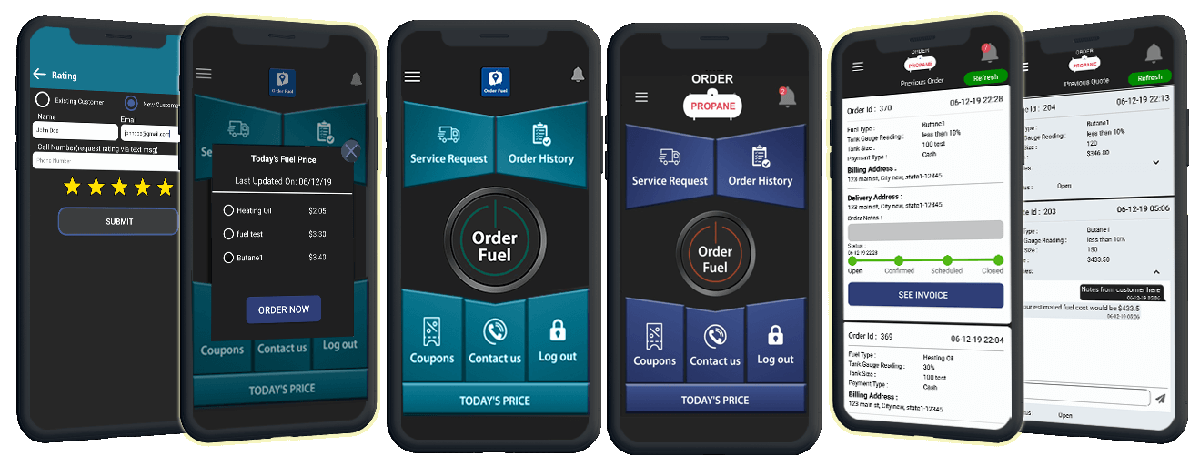
On Custom Fuel App, the customer flow is simple. They order fuel from the phone. They can pay with a credit card or another payment option you turn on. They can see fuel prices if you choose to show them. They can use an offer or a coupon if you create one. They can track the order. They can message you in the app instead of leaving a voicemail.
That last part is easy to skip, and it is one of the main jobs. The product pages put it this way: no more phone calls or emails needed to talk in real time. Instant messaging is built in. The office can send a status update in a couple of clicks. The customer does not have to call to ask where the truck is.
Push notifications go out from your own web dashboard, inside the phone they already have. You can send a notice about an order, a price, or an offer. You still own the relationship. The message comes from you.
None of this removes the phone line. Customers who want to call can still call. The app is a second door, not a locked one.
What does the office see when an order comes in?
Every order lands on your office web portal. You can manage incoming orders, message the customer, push a status update, and pull reports.
This is the other half of the product. The customer app is what they see. The web portal is what your office sees. Orders show up as they come in. You can filter them. You can run daily, weekly, monthly, and yearly reports. You can update status without picking up the phone.
If you also want a browser path, there is a web ordering portal. Customers who do not want to install an app can order from a page on your site. See the Web Ordering Portal. The mobile app and the web path are the same idea: the order is yours, in your brand, in a record you can work.
How is this different from a generic ordering portal?
A generic portal puts another company's name in front of your customer. A white-label app puts yours there. The customer stays in your brand when they order, pay, and check status.
That is the whole point of Custom Fuel App. It is not a shared consumer app where many dealers share one icon. It is your company app. When someone on your route opens their phone, they should see you.
If you want the product overview, start on the Custom Fuel App home page. If you are comparing tools, read how to choose a fuel customer ordering app.
What fuels can a branded ordering app handle?
Custom Fuel App is built for fuel delivery companies. That includes propane, heating oil, diesel, and compressed gas. The buyer is the fuel company. The end user is the customer who takes the delivery.
Do not shop as if only one fuel counts. Many companies run more than one product. The site has separate pages for propane ordering, diesel and heating oil ordering, and compressed gas ordering because the customer screens can match the fuel. The office still gets orders on the same kind of dashboard.
If your book is mixed, say so on the demo. Ask to see the fuels you actually deliver. Do not let a demo stay on one fuel if your trucks carry two.
How do you get a branded app live?
Custom Fuel App builds the app under your brand and hosts it. You do not need in-house developers to launch it or keep it running.
Public list price is $6,000 setup and $600 per month. That list is published here: https://fuelsite.pro/en/pricing/#pricing-section. Do not treat a quote on a call as the list. Do not treat this page as a contract. The list is the public number. A demo is how you see if the product fits.
To see it, request a demo or call 610-228-0887.
Does the app replace your office phone?
No. The app gives customers a way to order without calling. Your phone still works. Some customers will always call. That is fine.
The win is the orders that no longer sit on a sticky note. A written order on the portal is an order you can assign, update, and report. A voicemail at lunch on the first cold day is how orders get lost.
If you want the next question operators ask, read what happens when a customer runs out of fuel.