How to choose a customer ordering app for a fuel delivery company
Choose a customer ordering app by the job it must do. For a fuel delivery company, that job is this: your customers order, pay, and see status under your name, and your office gets a clean order on a dashboard. If a tool cannot do those four things, keep looking.
Is Custom Fuel App the right fit for your company?
Start with the job you need done. Do you need a customer app, the Blink package, or changes to your office tools?
| What you need | What to check |
|---|---|
| A customer app on its own | Already delivering fuel? Custom Fuel App lets customers order and pay by card under your brand. Your office gets a dashboard for orders, prices and messages. Ask which driver tools and website work your quote includes. |
| The Blink package | Blink Fuel includes Custom Fuel App, Tank Spotter and a custom website. The customer app is part of the package, so count it once. Tank Spotter is the app for drivers and field teams. |
| Changes to office work | Keep your current billing, account records, stock tracking and route plans until you know what changes. Which data moves to your current software, and how? Who checks payments and assigns deliveries? If drivers use a different tool, how do they get the order? Ask to see each step before you replace a process. |
Bring your dispatch software name and a sample order with no real customer details to the demo. Ask to follow it from the office dashboard through each handoff your dispatch software would need. Use this guide to test a fuel ordering app with your existing dispatch software before changing your office routine.
Use these guides to choose ordering options, see what stays with your office and dispatcher, and prepare for launch. Then use the demo link below to check your own order steps.
What should the app show under your name?
The app should show your name, your logo, and your colors. If it shows another company's brand, your customer is ordering in someone else's store.
White-label is not a paint job you add later. It is the first test. Open the demo as a customer would. Read the home screen. Read the order screen. Read the payment screen. If your name is missing, the tool is not a company app. It is a shared portal.
Custom Fuel App is built as a company app. The product pages use this line: your logo, your name, your app. That is the standard to hold every demo to. For the explainer, see what a white-label fuel ordering app is.
Can customers order, pay, and see status without calling?
They should be able to place an order, pay, and get a status update in the app. Calling the office should be a choice, not the only path.
Ask the vendor to walk one order from tap to truck assignment. Watch the customer place the order. Watch the payment step. Watch the office send a status update. If any of those three steps falls back to "they can always call," you do not have a working app. You have a brochure.
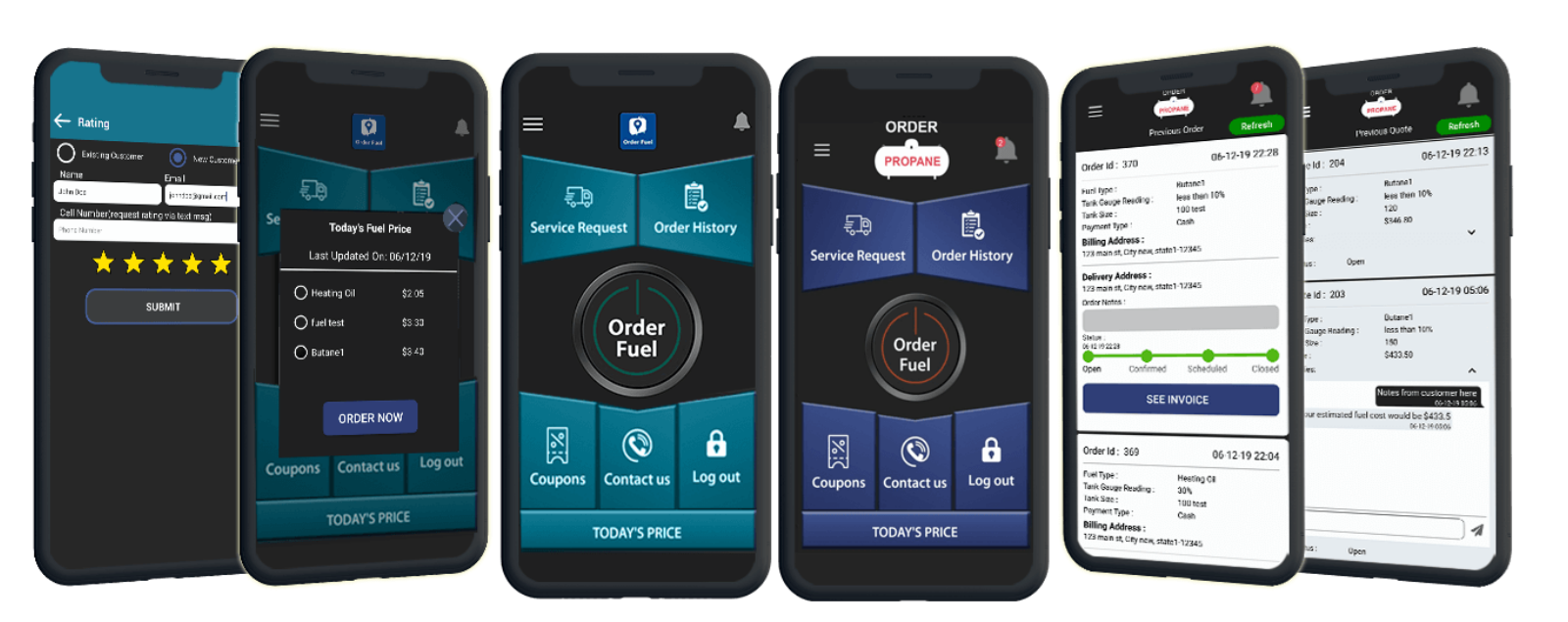
On Custom Fuel App, customers order from the phone. They can pay with a credit card or other payment options you turn on. They can track the order. The office can send a status update in a couple of clicks. Instant messaging is there if they need to talk without a voicemail.
Does the office get a real dashboard?
Yes. You need a web portal where orders arrive, staff can message the customer, status can be updated, and reports can be pulled. A pretty customer screen with no office side is a toy.
Fuel offices already run on lists: who called, who is on keep-full, who still needs a drop today. The app has to feed that work, not create a second pile. Look for incoming orders in one place. Look for filters. Look for daily, weekly, monthly, and yearly reports. Custom Fuel App's office portal is built around those jobs.
Also ask about a browser path for customers who will not install an app. Custom Fuel App has a web ordering portal for that case. The order should still land where the office already works.
If a customer cannot finish an app order, does my office help them or does your support team?
Before launch, name the first office contact for a customer who cannot place an app order. Agree with the product team how unresolved technical trouble reaches them and who in your office follows up. Keep phone ordering available while the issue is checked, and separate the fuel request from the software problem. Read who helps when a customer cannot place an app order with the employee who would take that call. Confirm support terms separately; app maintenance does not mean the vendor answers every customer question.
Will it work for the fuels you already deliver?
Ask to see the fuels you actually sell. Do not accept a one-fuel demo if your trucks carry more than one product.
Custom Fuel App is for fuel delivery companies, not one fuel only. The site has dedicated pages for propane ordering, diesel and heating oil ordering, and compressed gas ordering. A mixed book is normal. Say so up front. Make the demo switch fuels. If the tool cannot, it will fight your book later.
The buyer is the fuel company. Write your notes that way. "Will this help my office on the first cold week?" is a better test than "does this look modern?"
What should you ask about payments, prices, and messages?
Ask which payment options you can turn on, including credit cards. Ask whether you can show fuel prices or hide them. Ask how the office sends a status update. Ask whether customers can message you in the app.
Custom Fuel App includes those pieces on the product pages: different payment options, credit card payment, show fuel prices or show offers, coupons, instant messaging, and push notifications from your web dashboard. You do not have to turn every piece on. You should be able to see each one on a demo before you sign.
Do not buy on a promise of "unlimited leads" or a five-star score. Buy on an order you can watch move from the phone to the portal.
What does setup cost, and who hosts the app?
Public list price for Custom Fuel App is $6,000 setup and $600 per month. That list is published at https://fuelsite.pro/en/pricing/#pricing-section.
Ask who builds the app, who hosts it, and who publishes it under your brand. Custom Fuel App builds the app under your brand and hosts it. You should not need in-house developers to launch or keep it running. If another tool needs your IT staff to ship a store listing, price that time into the deal. It is real cost even when it is not on the invoice.
This page is not a contract. The public list is the number we can print. A quote on a call may differ. Ask which number you are looking at.
What should you ask on a demo?
Ask to see one live order from the customer phone to the office portal. Then ask to send a status update, show or hide a price, and send a push notice. If those steps work, you have a real tool.
Bring your own facts. How many will-call accounts do you have? Which fuels do you deliver? Do customers already pay cards, or is that new? Do you need a web page as well as an app? Write the answers before the call so the demo is about your book, not a canned tour.
Then look at the Custom Fuel App home page and request a demo, or call 610-228-0887. If runouts are the pain you feel each winter, also read what happens when a customer runs out of fuel.
Questions owners ask
How long does a custom fuel app take to build?
The usual timeline is about a week from your logo, colors, and fuels to a branded iOS and Android app plus the office dashboard. That is not a custom rebuild from zero. Custom Fuel App is a white-label product we already run. Extra fuels, payments, or a web-ordering page can add days, not months. Public list is $6,000 setup and $600 a month at fuelsite.pro/en/pricing. Next step: call 610-228-0887 with your logo files and the fuels you deliver.
Can customers see their tank level?
If the account has a tank monitor, ask on the demo whether that tank level can show in the branded app. Custom Fuel App is not itself a monitor. No monitor, no live tank number — the customer can still order, pay, and see delivery status. Do not sell tank level as a default if most of your book has no monitors. Next step: call 610-228-0887 with the monitor brands you use, if any.
Does the app support recurring propane delivery?
Yes. Recurring propane delivery is the keep-full / autofill path in the same app as will-call. The customer stays on a schedule without calling each time. Will-call stays available for the person who only orders when they want a fill. Your office sees both in the dashboard. That is the point of a company app: one place for both books. Next step: call 610-228-0887 and say whether most of your accounts are keep-full or will-call.