

Can my propane customers order a fill from an app?
By Bill Stomp, Founder/Editor
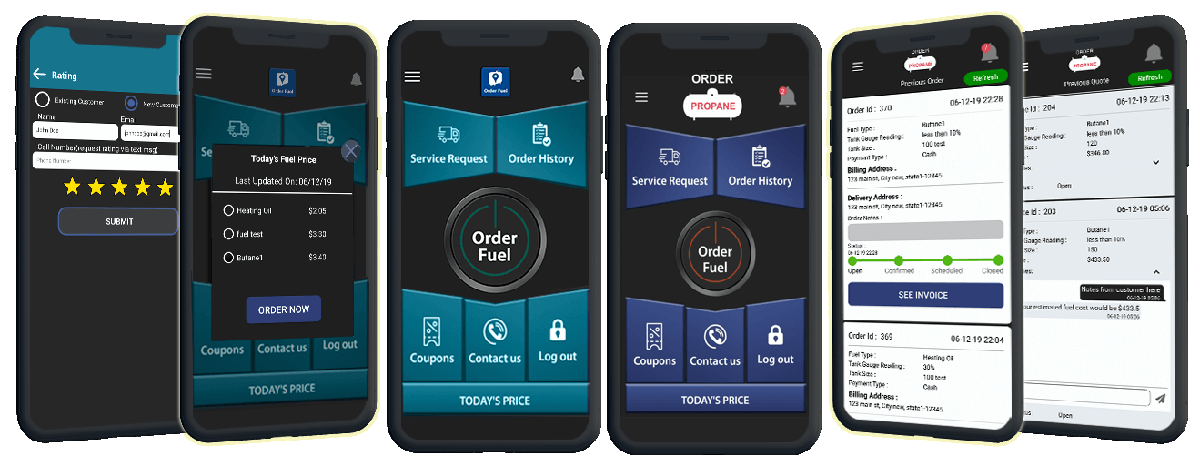
A propane delivery app for dealers can mean customer ordering or the driver’s delivery workflow. Custom Fuel App is the customer-facing app under your company name and logo: customers request a fill, check order status and message the office. Your office manages those requests in a web portal. The separate TankSpotter driver app supports the office-to-driver scheduling workflow shown on our delivery page.
Which propane delivery app does your dealer need?
Start with who will use it. Custom Fuel App gives customers an ordering app under your brand. Your office receives and manages the requests. The existing delivery workflow shows the separate TankSpotter driver app: the office schedules an order to a driver, the driver receives the job, and the completed form updates the office and customer order status.
For customer features, see propane ordering. For ordering from your current website, see web ordering. Review your routing and back-office requirements separately with the team before choosing a setup.
What your customers can already do
- Find the app under your company name, with your logo, in the App Store and on Google Play.
- Request a fill. You can also turn on a set number of gallons or a tank reading.
- See past orders and the status of an order.
- Order service and chat with your office.
- Pay by card in the app, and get your messages and push notifications.
How to review your propane customer app
- Compare your company name and logo in the app-store listing and on the ordering screen.
- Follow a sample fill request from the customer app to your office web portal.
- Check customer order status and office messaging.
- With your dispatcher, follow the separate driver workflow from office scheduling to the driver’s completed form. Ask which parts your existing systems handle and what setup is needed.
Questions from propane dealers
Can my propane customers order a fill from an app?
A propane delivery app for dealers can mean customer ordering or the driver’s delivery workflow. Custom Fuel App is the customer-facing app under your company name and logo: customers request a fill, check order status and message the office. Your office manages those requests in a web portal. The separate TankSpotter driver app supports the office-to-driver scheduling workflow shown on our delivery page.
Is a customer ordering app the same as a driver dispatch app?
No. Custom Fuel App is the branded customer ordering app. The delivery workflow on this site shows a separate TankSpotter driver app, with the office scheduling the request and receiving the completed job details. Review that setup with your dispatcher.
Can customers order without downloading the app?
Yes. Custom Fuel App also offers web ordering for your existing website. Ask to see the browser ordering page alongside the branded mobile app.
Does requesting a fill guarantee a delivery time?
No. A fill request goes to your office to manage. Review the scheduling and confirmation workflow with your team before launch.
See the propane ordering features and website ordering option. Need the app and a new website together? See Blink Fuel’s complete package.
Talk to us: Call 610-228-0887 or book a demo. We will walk you through a fill request on an app that carries your company name.